
Your boat
Tell the app about your boat: speed, fuel burn, tank, reserve, and your sea and wind limits.
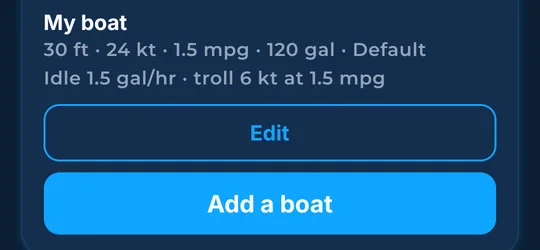
What it shows
Your boat's numbers drive the fuel and time math for every trip.
How to find it
- In More, find the boats card. Tap a boat to make it the default, tap Edit to change it, or tap Add a boat.
- Tap Remove to delete an extra boat.
How to use it
- Edit the name, length, cruise (cruising speed), burn (how much fuel it uses), tank, reserve (fuel you keep and do not plan to use), idle, and troll (slow speed while pulling lures).
- Tap Use one-third of the tank for the reserve.
- Set Caution seas, Rough seas warning, Caution wind and High wind warning to match your boat and crew.
- Tap Save boat, or Cancel to leave without saving.
In the app tour
Tour step 47 of 67 · Boat & export · The boat
Edit the name, length, cruise, burn, tank, reserve, idle, and troll. Tap Use one-third of the tank for the reserve. Set Caution seas, Rough seas warning, Caution wind, and High wind warning. Tap Save boat. Tap Cancel to leave without saving.
Tour step 61 of 67 · More (settings) · Boats in More
Tap a boat to make it the default. Tap Edit to change it. Tap Remove to delete an extra boat. Tap Add a boat.
See this step in the full tutorial →
Related
Every layer is included
One subscription opens every layer and feature. Founders get the first year for $80. See ordering and prices or give a year as a gift.
See The Bite is coming to the App Store and Google Play. The store links are not live yet.