
Layer · lines and marks
Wind
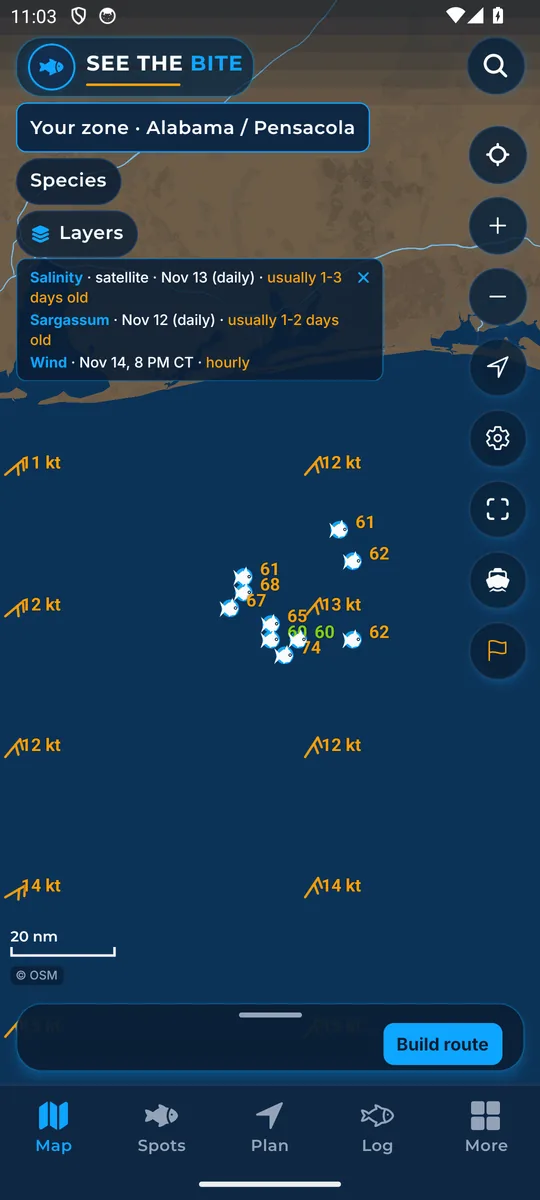
Wind marks and speeds for the current hour.
What it shows
Feathered marks point with the wind. Labels show its speed.
Where the data comes from
Open-Meteo hourly weather forecast for the current hour.
How to turn it on
- Tap Layers, then More layers, and tap the Wind switch. Wind is also a switch in More.
How to use it
- Check the ride out and home before choosing fishing water.
- Speeds follow your units (knots, mph or km/h). See Units.
In the app tour
Tour step 26 of 67 · Layers · Wind
Wind draws the wind field. Tap the switch to show or hide it.
See this step in the full tutorial →
Related
Every layer is included
One subscription opens every layer and feature. Founders get the first year for $80. See ordering and prices or give a year as a gift.
App Store coming soonGoogle Play coming soon
See The Bite is coming to the App Store and Google Play. The store links are not live yet.