
Map
Map buttons
Zoom, center, show where you are, settings, show all, recenter, the sea note flag and the map credit.
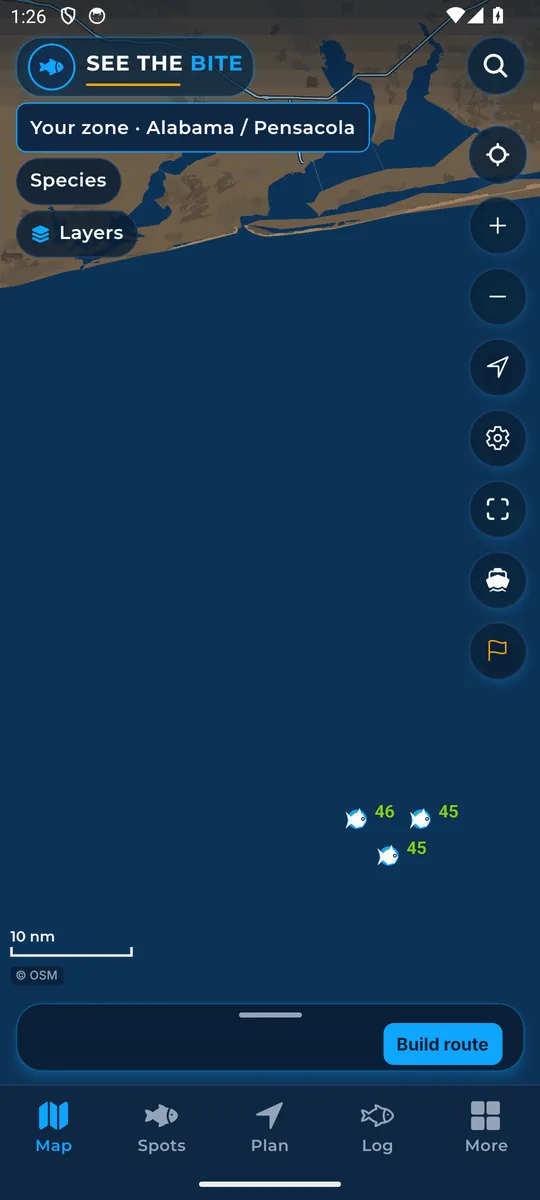
What it shows
A column of round buttons sits on the right side of the Map.
How to find it
- The buttons are always on the right side of the Map.
How to use it
- Zoom in and Zoom out.
- Center on the chart brings the map back to your zone.
- Show where I am puts your boat on the chart. See Where you are.
- Settings opens More.
- Show all fits your whole trip on the screen.
- Recenter on the start jumps to your starting place.
- The flag, when it shows, opens the sea note in the trip sheet (the app's short note on sea conditions).
- Tap © OSM for the map credit. With the NOAA chart on, the credit includes NOAA.
In the app tour
Tour step 7 of 67 · Map · Map buttons
On the right: tap Zoom in, Zoom out, Center on the chart, Show where I am, Settings, Show all, and Recenter on the start. The flag, when it shows, opens the sea note in the trip sheet. Tap © OSM for the map credit. With the NOAA chart on, that credit includes NOAA.
See this step in the full tutorial →
Related
Every layer is included
One subscription opens every layer and feature. Founders get the first year for $80. See ordering and prices or give a year as a gift.
App Store coming soonGoogle Play coming soon
See The Bite is coming to the App Store and Google Play. The store links are not live yet.