
Data as of: how fresh is the water?
Check as-of times where available. Some readings have an unknown time.
What it shows
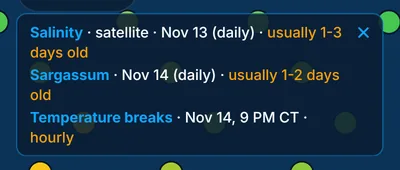
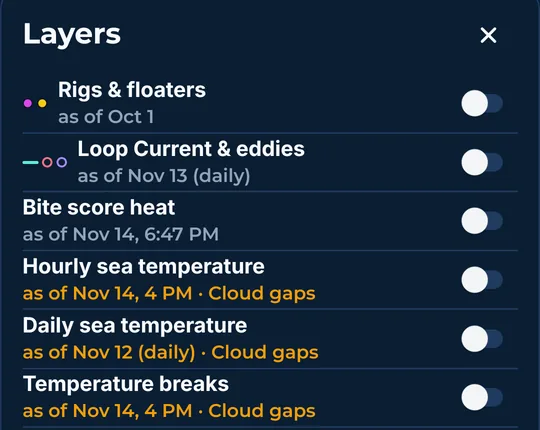
Each feed that is on shows its as-of time in the layer dates card. Older data and Cloud gaps (spots satellites could not see through clouds) use the warning color. The More layers sheet shows the same time under every layer.
How to turn it on
- The layer dates card shows up when a layer is on.
- Tap the × on the card to hide it.
- Tap the calendar beside Layers to show it again.
How to use it
- Check the time before you trust a picture. Satellite pictures can be hours or days old.
- Sea conditions at the bottom of the list use the same kind of time.
- The tap card also shows a time for each reading, and says cloud covered or time unknown when it should.
In the app tour
Tour step 33 of 67 · Layers · Data as of
Each feed that is on shows its as-of time here. Older data and Cloud gaps use the warning color. Tap the × on the card to hide it. Tap the calendar beside Layers to show it again. Sea conditions at the bottom of the list use the same kind of time.
See this step in the full tutorial →
Related
Every layer is included
One subscription opens every layer and feature. Founders get the first year for $80. See ordering and prices or give a year as a gift.
See The Bite is coming to the App Store and Google Play. The store links are not live yet.