
Bite Score heat layer
Paints the 0 to 100 Bite Score as a color field for the fish you picked. All six species are scored throughout launch waters.
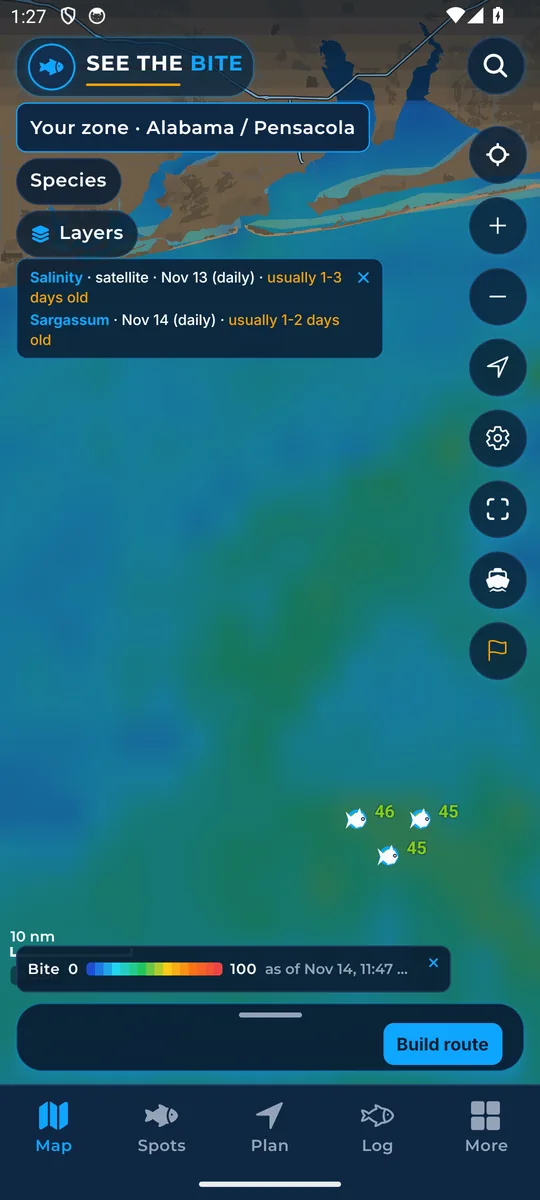
What it shows
The color field ranks fishing water from low to high scores for the fish you picked. A high score is a clue, not a promise.
Where the data comes from
Our published scores, built from public ocean and weather data. Check the score date.
How to turn it on
- Tap Layers, then the Bite Score checkbox.
- In More layers the same switch is called Bite score heat.
How to use it
- Compare better water within a safe run from your port.
- The number on a spot does not change. This layer only swaps the color picture.
- It shares one color picture with sea temperature and chlorophyll.
- Read How the Bite Score works for the plain-language version.
Names in the app: Bite Score in the Layers list. Bite score heat in More layers.
In the app tour
Tour step 18 of 67 · Layers · Bite Score layer
Bite Score paints the 0 to 100 field. Tap the checkbox. Under More layers the same switch is named Bite score heat. The number on a spot is unchanged. This only swaps the color picture.
See this step in the full tutorial →
Related
Every layer is included
One subscription opens every layer and feature. Founders get the first year for $80. See ordering and prices or give a year as a gift.
See The Bite is coming to the App Store and Google Play. The store links are not live yet.