
Sea-temp colors (adjustable range)
Lock a low and a high temperature so small breaks stand out.
What it shows
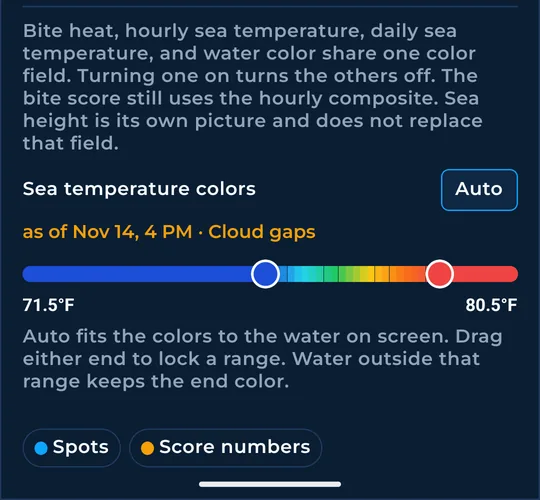
The Sea temperature colors bar sets which temperatures get the full spread of colors. Narrow it and small changes in the water stand out.
How to turn it on
- Tap Layers, then More layers, and scroll to Sea temperature colors.
- With sea height off, a Sea temp colors card also sits on the chart and works the same way.
How to use it
- Drag either end of the bar to lock a low and a high. Steps are half a degree. The numbers sit on the bar.
- Tap Auto to fit the colors to the water on screen again.
- Water outside your range keeps the end color.
- Temperature breaks follow the same range, so they change color with it.
In the app tour
Tour step 34 of 67 · Layers · Sea-temp colors
Drag either end to lock a low and a high. Steps are half a degree. The numbers sit on the bar. Tap Auto to fit the water on screen again. Water outside the range keeps the end color. With sea height off, Sea temp colors sits on the chart and works the same way.
See this step in the full tutorial →
Related
Every layer is included
One subscription opens every layer and feature. Founders get the first year for $80. See ordering and prices or give a year as a gift.
See The Bite is coming to the App Store and Google Play. The store links are not live yet.