
Map
Your zone
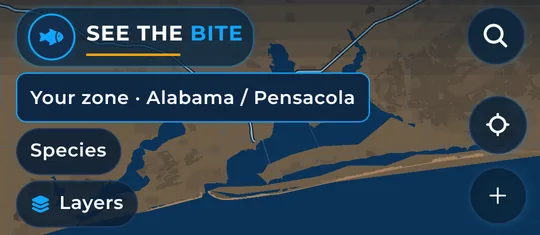
The zone chip shows the stretch of coast your trip stays inside.
Screenshot coming soon
What it shows
The Your zone chip at the top of the Map shows the coast a trip stays inside. At launch, the app covers offshore waters from Texas around Florida and the Keys up the East Coast to New England.
How to find it
- The chip is always shown at the top left of the Map.
How to use it
- If your GPS puts you on another coast within launch coverage, a travel card can offer Download as an extra.
- Tap Close on that card. Your home coast does not change.
- To plan on a different coast or let a long run leave the zone, see Zones and Go anywhere.
In the app tour
Tour step 5 of 67 · Map · Your zone
This chip is the coast a trip stays inside. If GPS is on another coast within launch coverage, a travel card can offer Download as an extra. Tap Close on that card. Home does not change.
See this step in the full tutorial →
Related
Every layer is included
One subscription opens every layer and feature. Founders get the first year for $80. See ordering and prices or give a year as a gift.
App Store coming soonGoogle Play coming soon
See The Bite is coming to the App Store and Google Play. The store links are not live yet.