
Rigs & floaters
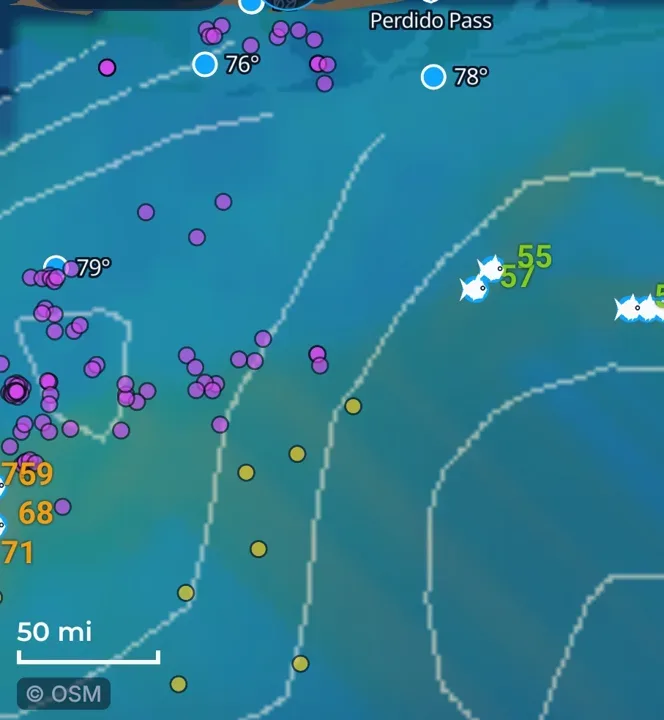
Oil platforms and floating rigs on the chart, each with a score for your fish.
What it shows
Pink dots are standing oil platforms. Yellow dots are floating ones (floaters). Fish may gather around them.
Where the data comes from
BOEM public platform structures and locations, with separate fishing scores. Platform records reflect their publication date. Positions can change.
How to turn it on
- Tap Layers, then the Rigs & floaters checkbox. The same switch is in More layers.
How to use it
- Compare nearby structure, water and score before choosing a stop.
- Tap a rig to see its name and its score. See Rig cards.
- When you build a route, check Include rigs to add platforms as stops.
In the app tour
Tour step 9 of 67 · Layers · Rigs & floaters
Rigs & floaters draws platforms and floating gear. Tap the checkbox to show or hide them. The same switch is in More layers.
See this step in the full tutorial →
Related
Every layer is included
One subscription opens every layer and feature. Founders get the first year for $80. See ordering and prices or give a year as a gift.
See The Bite is coming to the App Store and Google Play. The store links are not live yet.